Скриншоты
Сведения о приложении
- Версия
- 4.2
- Размер
- 3.99 MB
- Обновлено
- September 26, 2024
- Требуется
- Windows 11
- Язык
- English
- Лицензия
- Full
- Разработчик
- Machete
- Категория
- Windows OS
SoftPas на:
Этот продукт также доступен на следующих языках:
О Machete Video Editor
Download Machete Video Editor – Free Basic Video Editing Tool for Windows & Mac
Machete Video Editor — это лёгкая бесплатная утилита, сосредоточенная на основных задачах, которые нужны большинству любительских видеосоздателей: вырезать, копировать, вставлять и удалять части видеофайла. Хотя она не конкурирует с тяжёлыми пакетами, такими как Adobe Premiere Pro или DaVinci Resolve, её простота делает её идеальным помощником для быстрых правок, обрезки нежелательных кадров или склеивания коротких циклов без нагрузки сложного интерфейса. Помимо базового редактирования, Machete также служит надёжным медиаплеером, поддерживая широкий спектр аудио‑ и видеокодеков «из коробки». Если вы ищете безопасное решение без лишних функций для небольших видеокорректировок в Windows или macOS, Machete Video Editor предлагает именно это — скорость, стабильность и минимальный след на вашей системе.Key Features and Functionalities
- Simple Cut & Trim: Slice video files at any frame with millisecond precision.
- Copy & Paste Segments: Re‑order scenes by copying sections and pasting them elsewhere in the timeline.
- Delete Unwanted Parts: Remove glitches, commercials, or dead air without re‑encoding the entire file.
- Loop Creation: Build seamless loops for GIF‑style clips or background videos.
- Built‑in Media Player: Preview edits instantly; supports popular codecs such as MP4, AVI, MKV, MOV, and more.
- Lossless Editing: Operations are performed without recompressing the source, preserving original quality.
- Portable Version: Run the editor from a USB stick on any compatible computer.
- Free & Secure: No hidden fees, no telemetry, and regular updates to patch security issues.
Installation, First‑time Use, and Compatibility
Getting started with Machete Video Editor is intentionally straightforward. Follow the steps below to install and begin editing within minutes.
Step‑by‑Step Installation (Windows)
- Visit the official Machete website and click the “Download for Windows” button.
- The installer (typically a
.exefile) will be saved to yourDownloadsfolder. - Double‑click the installer and accept the license agreement.
- Choose the destination folder (the default location works for most users) and click “Install”.
- Once installation completes, launch Machete from the Start menu or desktop shortcut.
Installation on macOS
- Download the macOS package (
.dmg) from the official site. - Open the
.dmgfile and drag the Machete icon into theApplicationsfolder. - On first launch, macOS may warn you about an unidentified developer; right‑click the app, choose “Open”, and confirm you want to run it.
- The program is ready to use immediately—no additional runtime libraries are required.
First‑time Use
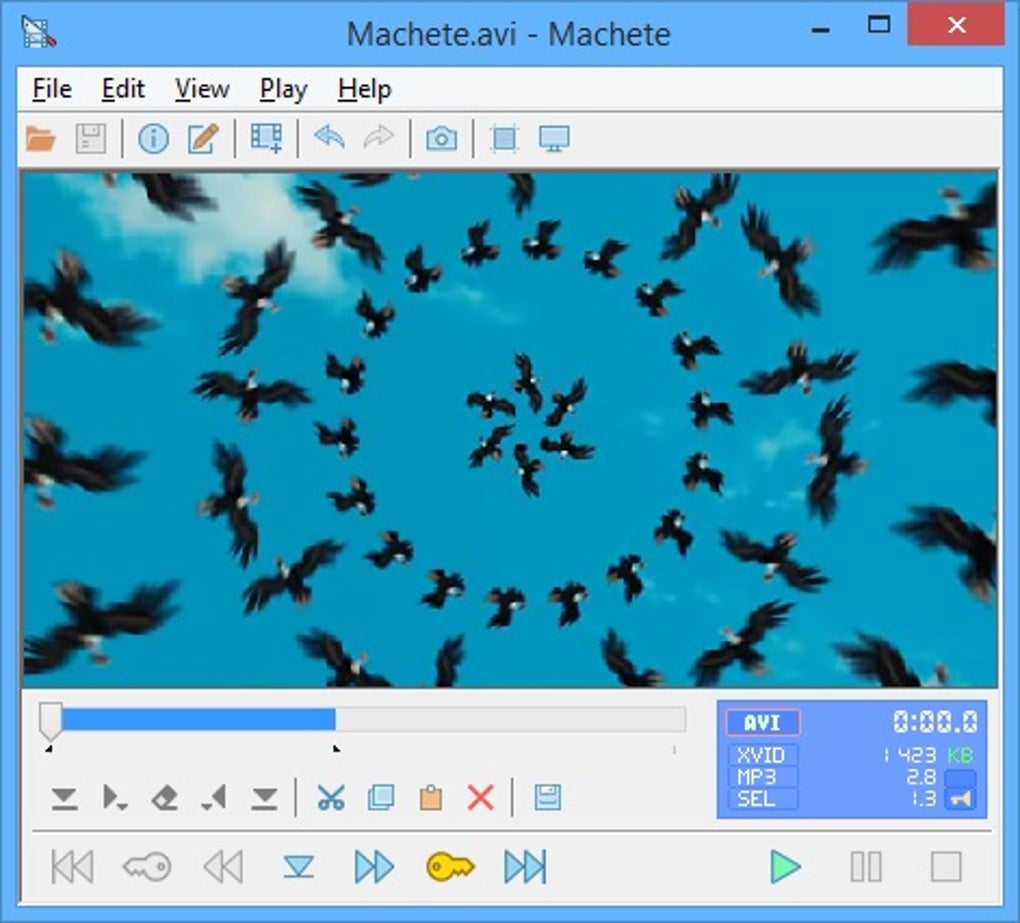
When you open Machete, you’ll see a minimalist window divided into two panels: a file browser on the left and a waveform timeline on the right. To edit a video:
- Click “Open” and navigate to the video file you wish to edit.
- The video loads into the timeline; you can zoom in for frame‑level accuracy.
- Use the “Set Start” and “Set End” buttons to mark the portion you want to keep, copy, or delete.
- Choose the appropriate action (Cut, Copy, Paste, Delete) from the toolbar.
- When you’re satisfied, click “Save As” to export the edited file without altering the original.
Supported Operating Systems: Windows 10/11 (64‑bit), macOS 10.13 and newer. The application does not currently have native Android or iOS builds, but the portable version can be run on any compatible desktop environment.
Pros, Cons, and Frequently Asked Questions
Pros
- Extremely lightweight – uses less than 30 MB of RAM.
- Lossless editing preserves original video quality.
- Built‑in media player eliminates the need for a separate viewer.
- Free and open to personal use with no hidden ads.
- Portable version makes it easy to work on multiple machines.
Cons
- Lacks advanced effects such as transitions, color grading, or multi‑track audio.
- No native support for Windows 7 or older operating systems.
- Interface may feel too spartan for users accustomed to richer UI.
- No direct export to social‑media formats (must be done in a separate tool).
- Limited documentation; relies on community forums for troubleshooting.
Frequently Asked Questions
Is Machete Video Editor truly free?
Yes, Machete is completely free for personal and educational use. There are no hidden fees or premium upgrades required to access the core editing functions.
Can I edit videos larger than 4 GB?
Machete can handle large files as long as your system has enough free disk space and RAM. The program processes edits without re‑encoding, so file size does not affect performance significantly.
Does Machete support subtitles or closed captions?
No, subtitle handling is outside the scope of Machete’s feature set. Users who need to add or edit subtitles should employ a dedicated subtitle editor before or after using Machete.
Is there a way to automate repetitive cuts?
Machete does not include scripting or batch‑processing capabilities. For repetitive tasks, consider using a more advanced editor or a command‑line tool like FFmpeg in conjunction with Machete.
How often are updates released?
The development team releases minor updates roughly every 3–4 months, focusing on bug fixes and codec compatibility improvements. Major feature releases are less frequent, reflecting the tool’s intentionally limited scope.
Conclusion – Should You Download Machete Video Editor?
For anyone who needs a quick, reliable way to trim, splice, or loop video clips without learning a complex interface, Machete Video Editor hits the mark. Its lossless workflow, built‑in playback, and completely free price tag make it a compelling choice for educators, content creators on a budget, and casual users who simply want to cut out the boring parts of a home video. If your projects require multi‑track editing, visual effects, or direct publishing to social platforms, you’ll quickly outgrow Machete and should consider a more robust suite. However, as a dedicated “quick‑cut” utility, it delivers on its promise: fast, secure, and easy to use on modern Windows and macOS machines.
Ready to give Machete a try? Click the button below to download the latest version and start editing your footage in seconds.
Download Machete Video Editor NowРуководства и уроки
Как установить Machete Video Editor
- Нажмите кнопку Скачать выше.
- После перенаправления примите условия и нажмите Установить.
- Дождитесь завершения загрузки Machete Video Editor на ваше устройство.
Как использовать Machete Video Editor
Это ПО в основном используется для основных функций, описанных выше. Откройте приложение после установки, чтобы изучить его возможности.
Отзывы пользователей
Отзывов пока нет. Поделитесь своим опытом первым.
Вам также может понравиться
еще
Llama 2
Free-to-use large language model As the new addition to Meta’s arsenal of langua...

NotebookLM
Revolutionizing the note-taking and idea-generation process NotebookLM is an exp...

Github co pilot
AI-inspired software development and coding platform GitHub Copilot is a browser...

Google Gemma
Google’s lightweight AI models Introducing Google Gemma , a family of cutting-ed...

AI Image Enlarger
A free app for Windows, by ai-image-larger. AI Image Enlarger is a free software...

DALL E
AI-driven text-to-image transformation engine DALL·E is a free graphic and desig...